
Campaign Management / Settings
Compliance
Configure dynamic TCPA compliance structures and customize consent experiences for leads across multiple endpoints.
Overview#
The Compliance tab enables dynamic TCPA (Telephone Consumer Protection Act) language configuration, ensuring legal alignment and flexibility in how consents are captured across multiple buyers and endpoints.
You can set a default/common TCPA language and override it at the endpoint level with buyer-specific compliance messages.
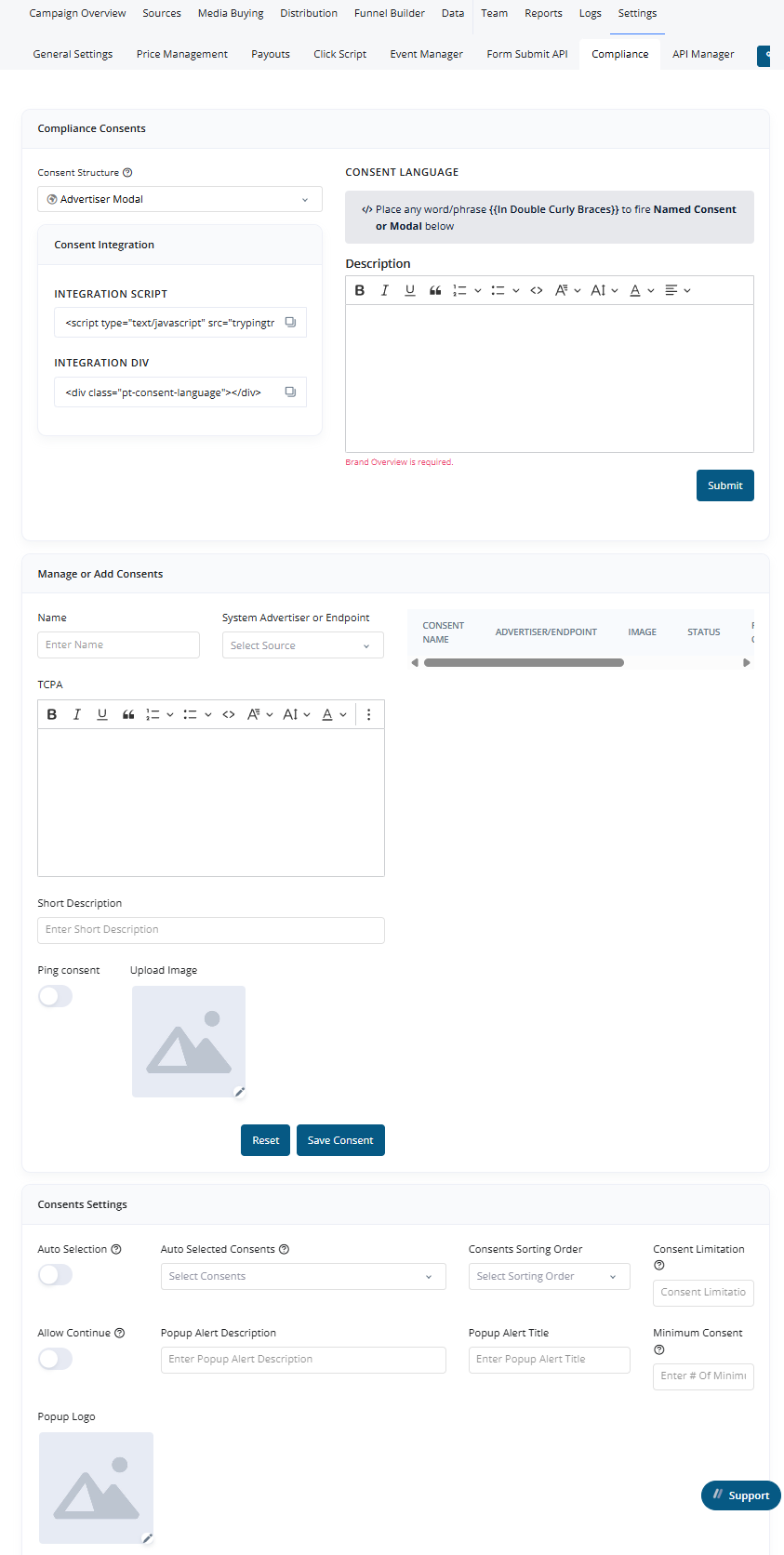
Consent Structures#
Pingtree supports five configurable TCPA models:
-
Advertiser Modal
Uses common TCPA language with{{buyer_list}}placeholders. Clickable links open a modal displaying a list of buyers. -
Single Option
Replaces{{}}placeholders with the name of the buyer determined by routing logic. -
1-to-1 Consent
Shows the specific TCPA language of the routed buyer (not the default text). -
1-to-Many Dynamic Consent
Displays a selectable list of buyers, each with unique TCPA language. The lead can be sold to any selected buyer. -
1-to-Many Selected Consent
Similar to above but uses a shared TCPA language. Buyer names and images appear in the consent section.
UI Sections#
1. Compliance Consents#
- Consent Structure: Choose one of the five TCPA consent models.
- Consent Language: Set a global default TCPA language.
- Consent Integration:
- Integration Script: Embed custom logic to load compliance dynamically.
- Integration Div: HTML element that will render the TCPA content.
2. Manage or Add Consents#
Configure settings per advertiser or custom endpoint:
- Display Name: Buyer name shown to users.
- TCPA Text: Custom consent language.
- Short Description: Brief buyer description.
- Image: Logo of the buyer.
3. Consent Settings (For 1-to-Many Models)#
Additional configurations for 1-to-Many Dynamic Consent and Selected Consent:
- Auto Selection: Automatically selects specific buyers in the list.
- Sorting Order of Buyers:
- Highest Daily Cap
- Highest Ping Amount
- Highest Average Payout
- Manual order (drag-and-drop)
- Consent Limitation:
- Set a maximum number of buyers users can select.
- Pop Alert:
- Enforce minimum required selections.
- Customize title, description, and image of the alert.
- Optionally enable "Allow Continue" toggle to permit continuation with fewer selections.
Tip: This flexible structure ensures compliance while optimizing user experience and buyer matching logic.